
Cada versión nueva de Moodle plantea la misma duda en los equipos de formación: ¿nos ponemos ahora o esperamos a la siguiente? Con la 5.3 esa decisión es más fácil de tomar, porque no es una versión de paso.
What’s new in Moodle 5.3? It’s the new long-term support release, and it introduces a fundamental change in how courses are designed: learning outcomes are now integrated into the platform, linking what students need to learn with the activities that help them achieve those outcomes. Along with this, the platform features a revamped interface with a dark mode and more user-friendly tools for day-to-day teaching and administration.
Here’s what your team will notice most if you work with Moodle.
An LTS version: planning is underway for this one
Version 5.3 is the next long-term support release following version 4.5, and that changes the schedule for any platform:
- It receives general updates for one year and security patches through October 2029.
- Version 4.5 will no longer receive security patches as of October 2027. If you’re still using a 4.x version, this is your next logical step.
- You can update directly from version 4.4 or higher, without any intermediate steps.
In other words: if your organization operates on long cycles and would rather not make changes to the platform every six months, this is the version you should stick with. And now is a good time to start reviewing plugins, themes, and server requirements—that’s where surprises tend to pop up.
Design the course around learning outcomes
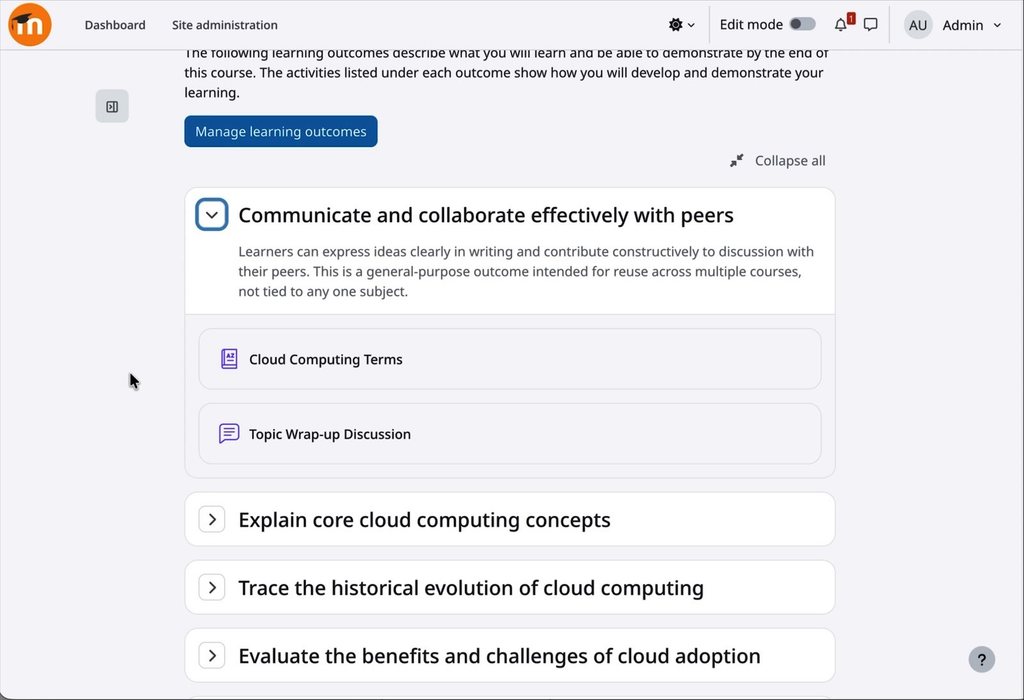
This is the major new feature of this version. Until now, the connection between what a course aims to achieve and what students do within it existed only in the teachers’ minds or in a separate document. Moodle 5.3 makes it visible within the course.
How it works:
- Each course defines its own learning outcomes and can use the ones the institution shares site-wide.
- The grading scale is optional: a result can describe what needs to be learned without assigning a grade.
- The results are linked to the activities based on each activity’s settings.
- They can be imported and exported, so they can be reused from one course to the next without having to redo the work.
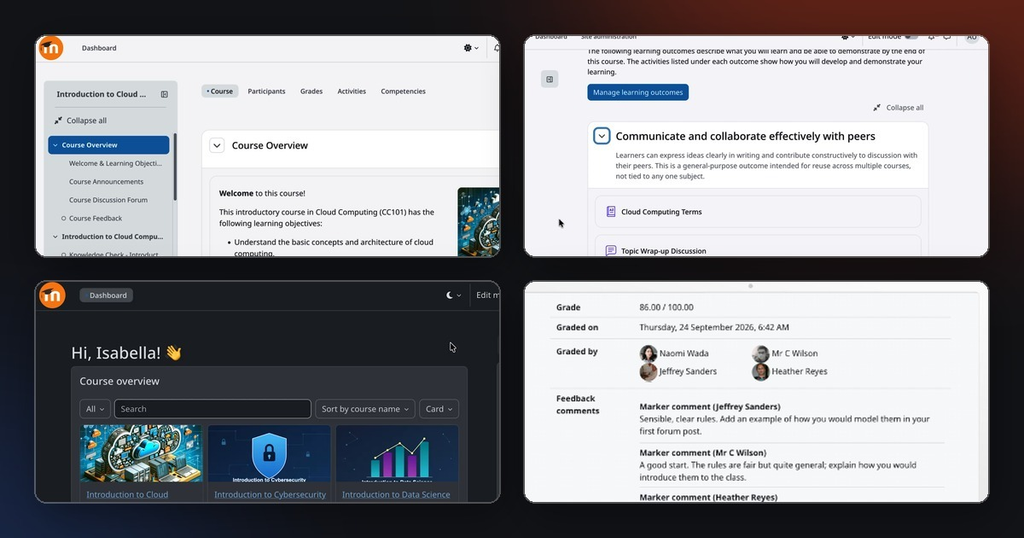
Students see this on a new page under “More,” with each learning outcome, its description, and, below that, the activities that help them achieve it. It’s no longer just a list of random tasks: it’s clear why each one is there.
Multiple graders, one grade
Collaborative grading began in version 5.2 and is completed in version 5.3. On the submissions page, each grader has their own column showing their grade and status, and Moodle combines those grades into a final grade based on the criteria you have configured—for example, the average.
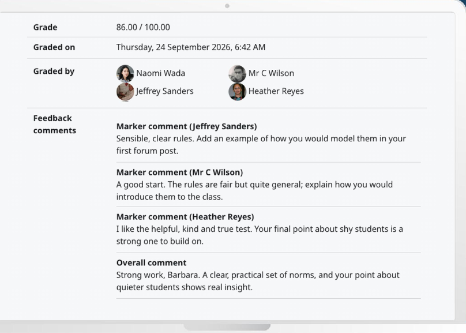
What this version offers is feedback. Each grader leaves their own comment alongside the grade they assign, in addition to the general comment for the student. When the grade is posted, the student sees on the same screen the final grade, who graded their work, what each person said (along with their name), and, at the end, the general comment.
Everything is set up in the assignment settings: how many required graders are involved, how many optional ones, and how the grade is calculated. Optional graders remain disabled for each student until a instructor enables them, which allows for moderation or sampling-based grading without leaving Moodle. This feature, by the way, originated within the community itself.
A clearer interface, and finally a dark mode
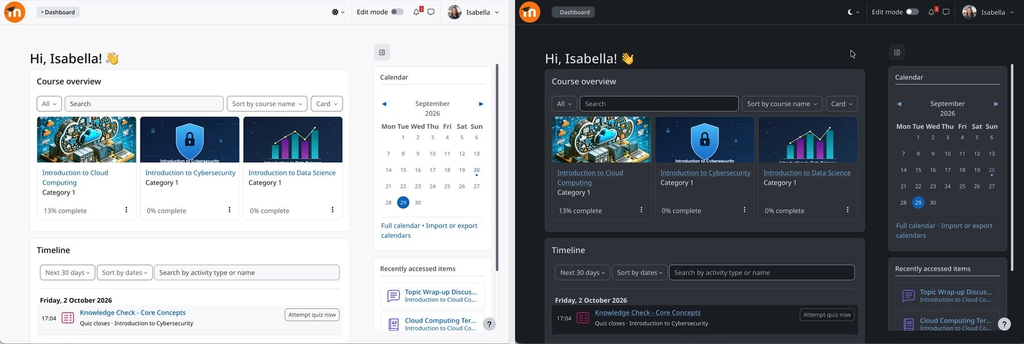
Dark mode was the community’s top-voted request on the tracker, with 70 votes. It’s now available in Boost as an experimental feature, with three modes (light, dark, and system) that each user can select from the top navigation bar. The administrator enables it from Boost’s experimental settings and sets the site’s default mode.
The rest of the facelift follows the same theme, less noise:
- New font, Noto Sans, across the entire platform.
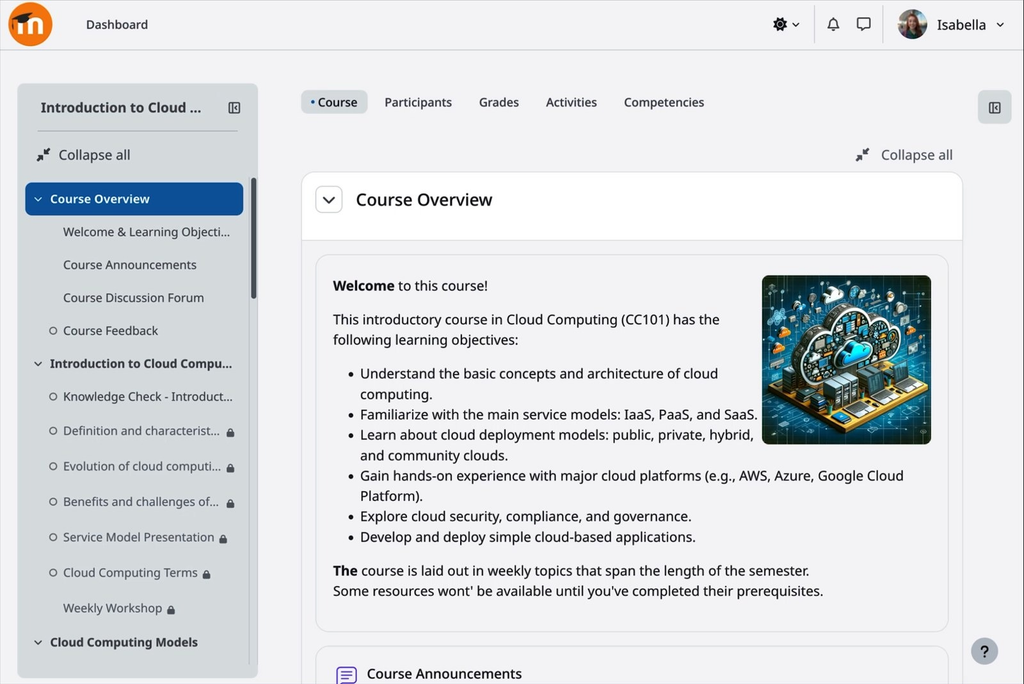
- The page focuses on the content: the course index and the block panel are positioned next to the main area, so on wide screens the text does not stretch to the edges.
- Each section is a card with a white header and a light gray body, so you can see where one ends and the next begins.
- Linear navigation: “Previous” and “Next” buttons at the bottom of each activity, so that students can work through the course in order without anyone having to set up that path manually.
Linear navigation is enabled in courses with a custom or weekly section format, as well as in existing courses when they are updated, and the administrator can disable it on a per-course basis if they prefer not to use it. The important thing to note: course structures and workflows remain unchanged. Users who are already familiar with Moodle will navigate the platform just as they always have.
More user-friendly tools for everyday life
These are small changes on paper—the kind you notice after a week of using them:
- Submission deadline for quizzes, separate from the closing date. It works the same way as for assignments: you set a clear deadline without blocking access; students can continue to attempt the quiz afterward, and those attempts are marked as late. It allows for exceptions for specific individuals or groups.
- Delete questions along with their category. When you delete a category from the question bank, Moodle shows how many questions it contains and how many are in use. You can move all of them or just the ones that are in use, and the rest are deleted in a single step. Questions used in a quiz are never deleted. Cleaning up no longer takes an entire afternoon.
- Accordion and new list styles in TinyMCE, without additional plugins. The accordion collapses content into sections that students can open and close, and it is inserted from the editor menu.
- BigBlueButton is enabled by default in new installations. It appears grayed out in the activity selector until an administrator connects it to a server, so faculty members know that the video conferencing option is available and who to contact to request it.
In addition, there are questionnaire reports filtered by user, more Safe Exam Browser options for supervised environments, and a question bank where bulk actions work the same way as on course pages.
Reports and Administration: Less waiting and more context
If you manage the platform, here are four things that will save you time:
- Group by date in the report generator—by week, month, or year. You can view trends directly within Moodle, without having to export them to a spreadsheet to repeat the same calculation. If you work with custom reports, this is a welcome feature.
- Delete courses in the background. A new setting sends the deletion to the queue: the course is marked as “in the queue to be deleted,” and you can keep working. This really makes a difference with large courses, which are the ones that take the longest.
- The Risks of roles, in plain sight. The list of roles sorts its risk icons by severity and uses much more readable colors; there is a column that shows how many users actually have each role, and clicking on an icon displays the associated capabilities. Auditing permissions no longer relies on memory.
- More refined global search. Find matches based on the beginning of words: if you type “mem,” “memory” and “memorizing” appear. With two words, it returns results that match both. And it works with the basic search engine that comes standard with Moodle.
Rounding out this section are scheduled tasks that can be queued on demand—without waiting for the next execution cycle—hearing forms that load faster, and login notifications enabled by default.
AI with more options and, finally, visibility
Moodle’s approach to artificial intelligence is based on two ideas: that you choose the provider that best fits your organization and that you can see how it is being used.
In version 5.3, Anthropic is now available in the core. It joins OpenAI, Azure, AWS Bedrock, Gemini, and the rest, so there’s no reliance on a single provider; you can even distribute which provider handles each function. It’s configured as usual: key, usage limits, and model selection in the advanced settings.
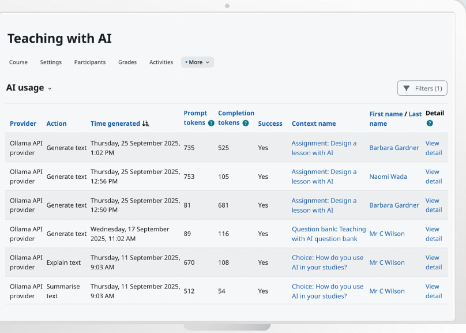
The other half is the report on AI usage in the course, found under “More” and “Reports.” Instructors can see who has used AI, in which activity, what type of request it was, and whether it worked—without accessing the instructions or the responses. And students have access to that same report from their end: each student can view only their own requests and review every instance in which they used AI during the course.
For any organization that is defining its policy on the use of AI in training, having its own data is more valuable than a policy drafted without concrete data.
What to check before updating
There are three technical changes that affect the planning of the update:
- The Classic theme is being removed from the core. Sites that use it automatically switch to Boost and retain their main settings, but if you have a custom theme based on Classic or force it via config.php, check it before making the switch.
- OAuth 2 with personal access tokens for the new REST API, allowing third-party systems to connect more securely.
- React is being integrated into the core as the foundation for future developments: the top and side navigation bars already use React components.
Full details are available in the Moodle 5.3 release notes.
Moodle 5.3 in detail: Our complete webinar
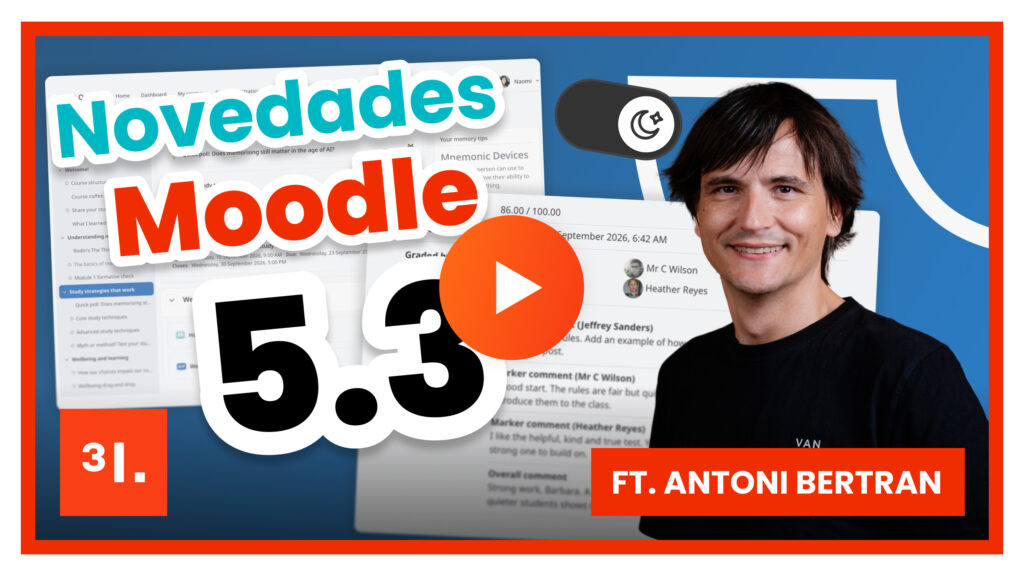
Antoni Bertran, CTO of 3ipunt, walked through all these new features live and demonstrated them within the platform, including examples of how to configure them. If you’d like to see them in action before deciding when to update, the full webinar is available here.
How we handle it at 3ipunt
Upgrading to an LTS version isn’t just a version number change. It involves reviewing plugins, custom themes, and integrations; deciding what to keep and what to remove; testing it in a pre-production environment; and planning the migration window so that training can continue uninterrupted.
At 3ipunt, we’ve been working with Moodle for over fifteen years, and we were Spain’s first Moodle Premium Partner. We are ISO 9001 and ISO 27001 certified, and Moodle has recognized us with the Major Open Source Contributor, Branded Moodle App Contributor, and Education Contributor of the Year awards. We bring that experience to every update, whether it’s for a platform with 200 users or 100,000.
If you also want to go beyond what the core offers (advanced analytics, visual tools, or smart notifications), the Fresk Suite is compatible with your Moodle and adds that layer without altering the platform’s structure.
Frequently asked Questions about Moodle 5.3
1. ¿Qué es Moodle 5.3 y por qué es importante?
This is the new Long-Term Support (LTS) version of Moodle, the successor to version 4.5. Its key new feature is learning outcomes, which link what students need to learn with the activities that help them achieve those outcomes. It also includes a redesigned interface with a dark mode and more user-friendly tools for teaching and administration.
2. How long will Moodle 5.3 continue to receive support?
It receives general updates for one year and security patches through October 2029. Since version 4.5 will no longer receive security patches as of October 2027, anyone still using a 4.x version should naturally upgrade to 5.3 next.
3. Can you upgrade to Moodle 5.3 from any previous version?
Se puede actualizar directamente desde la 4.4 o superior, sin saltos intermedios. Antes conviene revisar plugins, temas y requisitos del servidor, que es donde suelen aparecer las sorpresas.
4. How do learning outcomes work in Moodle 5.3?
Each course defines its own learning outcomes and can use those shared by the institution site-wide. The grading scale is optional, so a learning outcome can describe what students need to learn without being assigned a grade. They are linked to activities through each activity’s settings and can be imported and exported for reuse across courses. Students view them on a new page under “More,” where each learning outcome is listed along with its description and the activities that help students achieve it.
5. What changes when multiple graders are involved in the grading process?
On the submissions page, each grader has a column showing their grade and status, and Moodle calculates the final grade based on the configured criteria—for example, the average. In version 5.3, each grader can also leave their own comment, and the student sees the final grade, who graded the assignment, what each person said, and the overall comment all on the same screen. Optional graders allow for moderation or grading by sampling without leaving Moodle.